Smarter data retrieval in chat, A more polished chat, Focus visible in the agent's plan in chat, Your scope stays yours, Better team & invite management, Consistent account IDs, Easier automation setup, New guides
Smarter data retrieval in chat
When you ask a question in chat, the agent retrieves highlights, recordings, and context to build its answer. That retrieval is now more accurate and more transparent — three improvements this week:
Tags + semantic search. Tags are great for scoping, but on their own they can cast a wide net. The chat agent now layers semantic search on top of tag filters when your question carries meaning beyond the tags themselves — returning tighter, more relevant highlights while staying within the tagged scope.
Smarter filter suggestions. The chat AI no longer mistakes example values or output directions for actual data instructions — like locking results to a sample date or a date in the future. Suggested filters in chat reflect what you actually mean, handle dates reliably, and ask for confirmation when intent is ambiguous.
Clearer vector search labels in Focus. Focus filters now show the actual search term driving retrieval as the chip label — with a magnifier icon and a tooltip for longer queries — instead of a vague "prompt filter" label.
The theme across all three: you can see what's shaping retrieval in chat and trust that it matches what you asked for.
A more polished chat
Chat feels noticeably better to use this week, with improvements across input, header, and navigation:
Faster typing. Follow-up messages now feel instant. We isolated the input handler so keystrokes no longer trigger full-page re-renders — even in long threads. Text appears the moment you press a key.
Redesigned chat header. All chat actions live in a single header menu instead of being scattered across hidden icons and misleading UI. Renaming is a quick sub-step inside that menu, and the header is now visually aligned with the rest of the app — consistent height, centered title, Activity and Cluster items lined up with the navigation.
New Chat and Search Chat are always within reach. Both buttons are now pinned at the top of the main navigation, so you can start or find a conversation without scrolling past a long list of dashboards, recordings, and chats.
Focus is now visible in the agent's plan in chat
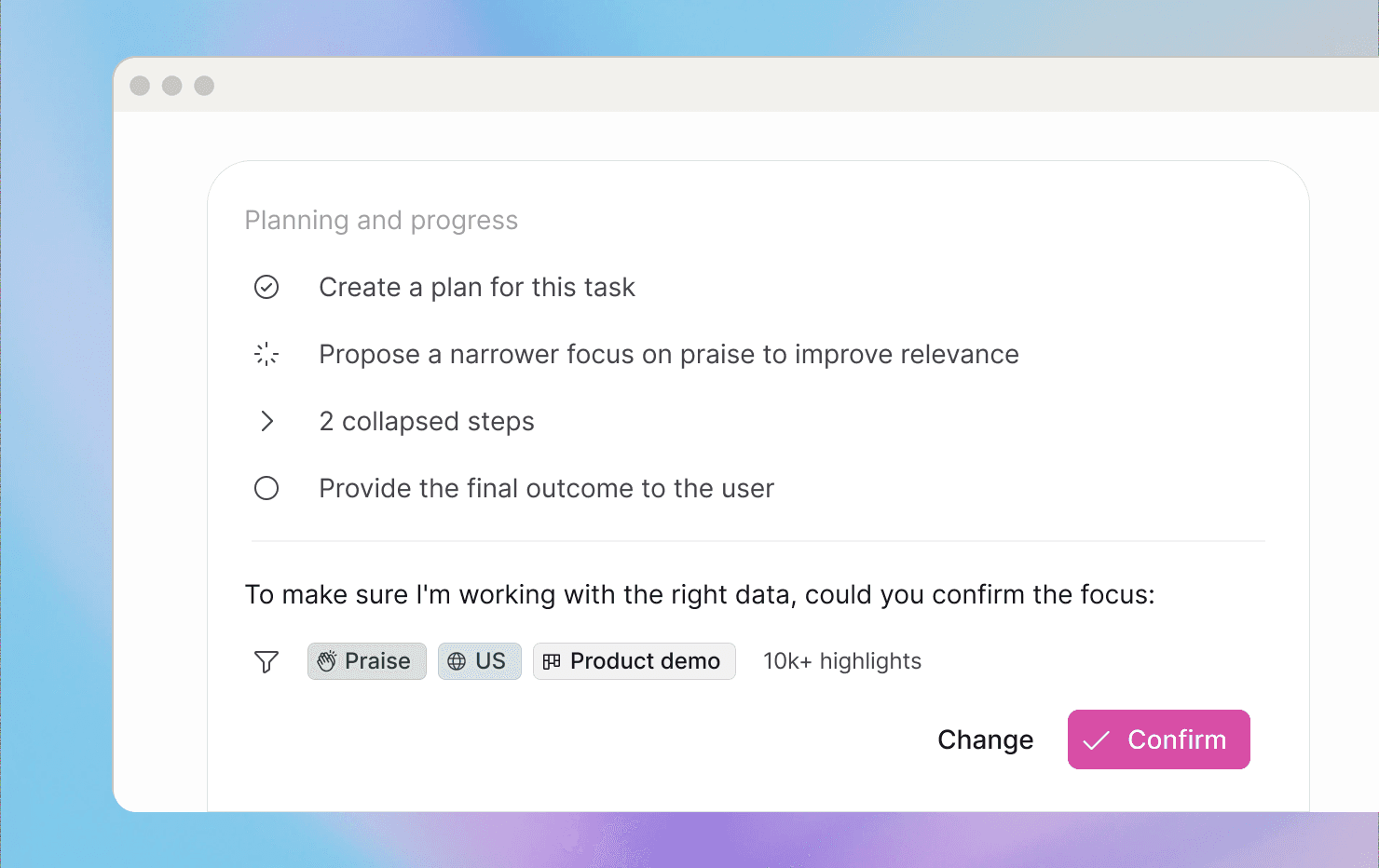
When you ask a question in chat, the agent builds a plan before it executes — and that plan now shows the full picture. The applied Focus appears directly beneath each step, and confirmations that used to live in a separate area are now inline with clear titles and status icons. You can follow the agent's reasoning top to bottom — what data it's working with, what it decided to do, and where things stand — in a single view.
Your scope stays yours
The AI now works with the data you chose — not a narrower slice it decided on its own. Three changes this week put you back in control:
No more auto-narrowing in chat. Starting a chat from a recording or highlights selection no longer auto-proposes a tighter focus. Your first query stays on the full recording or the exact highlights you selected.
Opt-in tag focusing in chat. Ambiguous or auto-imported tags no longer silently narrow retrieval. Tags only affect what the chat agent retrieves when you explicitly enable them.
Automations stay in their lane. Automated runs can no longer quietly redefine their own Focus. Automations now use only the filters you set when you built them — nothing more. Scheduled outputs stay predictable.
Better team & invite management
Adding the right people to a teamspace is now straightforward, with improvements across Settings and the Share dialog:
No more duplicate invites. The people picker in Settings recognizes existing users by email — showing their avatar, name, and address in the dropdown — so you can add them directly instead of hitting a dead-end "Account exists" error.
Clear invited status. The user table in Settings now flags invitations that haven't been accepted yet, so admins can immediately tell who's pending versus active.
Visible invite emails. The Share teamspace dialog shows the invited email address beneath each person's name. Spotting a mismatch between someone's login and invite email takes a glance, not a support ticket.
Consistent account IDs
Account data from different sources now plays well together. We've moved account ID generation from per-integration to per-teamspace scope (starting with Q&A and Uberall), so the same account stays the same account regardless of how it was imported. You can upload data into different teamspaces without conflicts, update accounts reliably via CSV, and link the same accounts across highlights and recordings without mismatches.
Easier automation setup
Configuring automations is now clearer and more predictable, with two improvements to the automation canvas:
Modal step configuration. Step settings now open in a focused modal with Save/Cancel buttons and built-in validation — so you catch issues like a malformed GitHub repo path before anything is saved, and the canvas stays clean while you edit.
Full visibility on selected Focus values. Focus selection in the automation editor no longer silently cuts off extra values. The updated editor makes it obvious at a glance exactly how many items are selected, so you don't have to reopen a filter just to double-check.
New guides
We've added two sets of guides this week.
Real-world user guides. Setting up NEXT AI often comes down to how features work together, but our docs didn't always show the combinations teams use in practice. We've analyzed successful configuration and usage patterns and folded the best practices into the Help Center — so you can configure NEXT AI faster, follow proven workflows, and skip the trial-and-error:
Deep-dive guides. Four new guides to help you get more from your customer data at a strategic level: