Updates
Updates
Updates
Features, Fixes & Improvements.
Features, Fixes & Improvements.
Recordings
Recordings
Recordings
December 19, 2025
Weekly updates (19 Dec '25)
All updates
Another week, another set of improvements designed to make your work faster, clearer, and more predictable. Here’s what shipped recently 👇
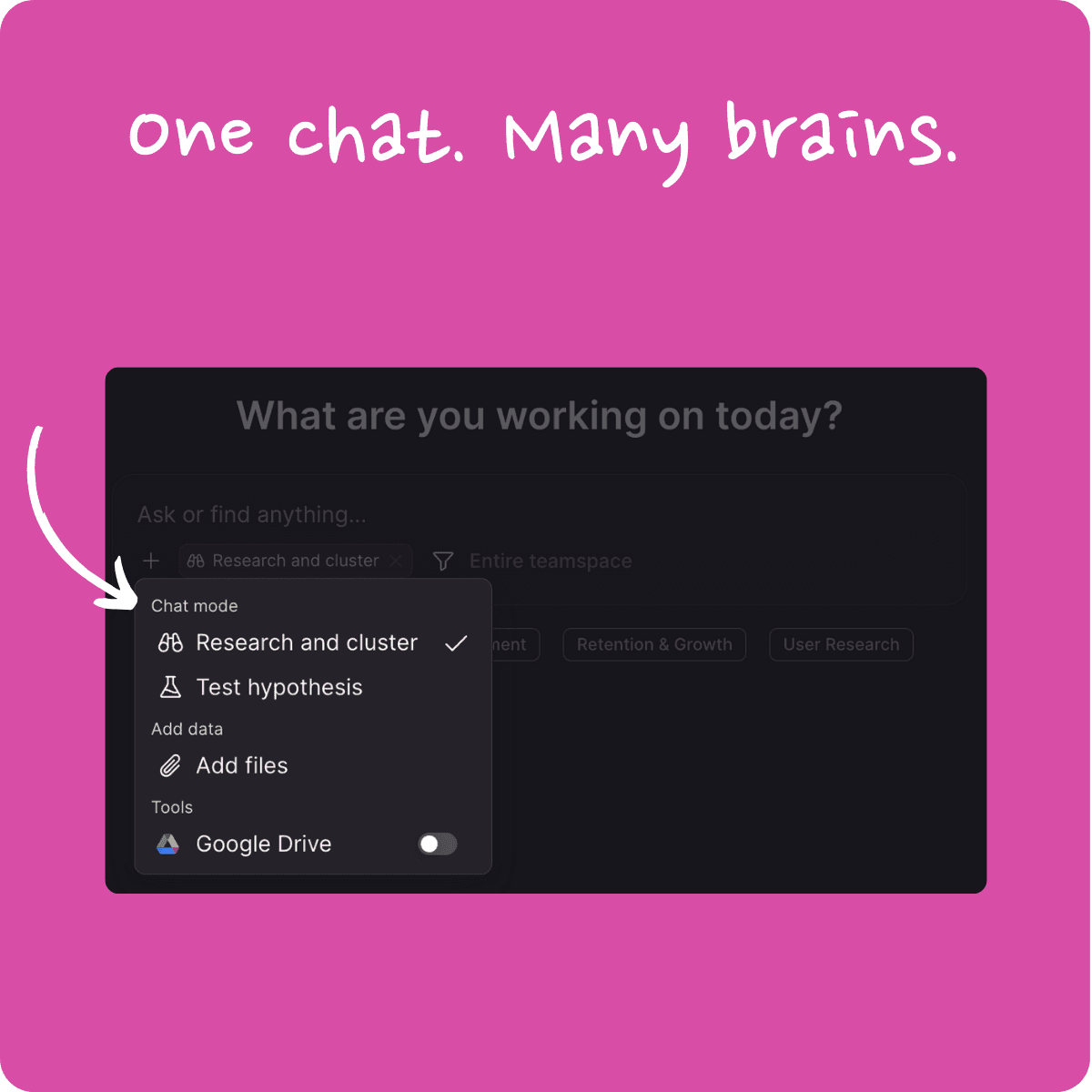
New Chat Modes for More Directed Answers 🎉
You can now guide how the AI thinks by selecting a chat mode before sending your message.
Choose between Research and cluster (to group, quantify, and explore themes) or Test hypothesis (to validate or refute assumptions using data).
Each mode is clearly explained on hover and visibly marked when active, so you always know what’s shaping the response. The result: more intentional answers, without adding complexity to the chat experience.
Chat Now Supports Accurate Multi-Tag Focus 🎉
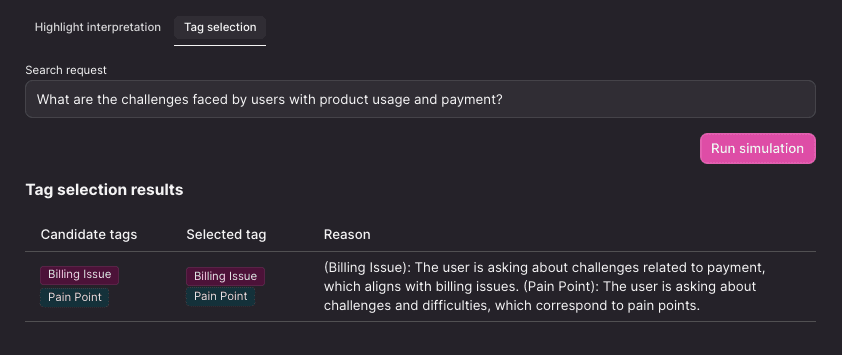
The chat now automatically narrows its focus using all relevant tags - not just one. This leads to more precise insights, especially when multiple dimensions matter.
To make this transparent, you can inspect tag choices via Tag Selection Simulation and review the reasoning in a dedicated evaluation report. Better focus in, better answers out.
Prompt Templates on Home Now Apply Focus 🎉
Homepage prompt templates now apply both the prompt and its predefined focus in one click.
That means templates can reliably answer scoped questions - by region, time period, product, tag, or segment - without relying on auto-narrowing. The focus is visible in the prompt box, ready for review before sending, so there are no surprises.
Homepage Prompt Templates Now Available Everywhere 🎉
The default homepage prompt templates are now available across all existing teamspaces.
Previously limited to newly created spaces, these starting prompts are now consistently available to everyone - making it easier to jump into meaningful analysis from day one.
Validation for GitHub Repositories in Automations UI 🎉
Configuring GitHub-based automations just got smoother. Repository values are now validated as you type, and automations can only be saved once everything checks out.
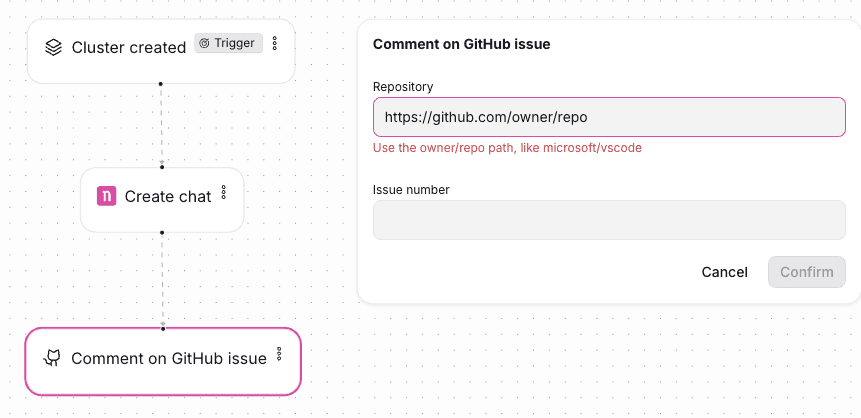
This prevents misconfigurations early and avoids broken setups later — so automations work the way you expect, from the start.
Another week, another set of improvements designed to make your work faster, clearer, and more predictable. Here’s what shipped recently 👇
New Chat Modes for More Directed Answers 🎉
You can now guide how the AI thinks by selecting a chat mode before sending your message.
Choose between Research and cluster (to group, quantify, and explore themes) or Test hypothesis (to validate or refute assumptions using data).
Each mode is clearly explained on hover and visibly marked when active, so you always know what’s shaping the response. The result: more intentional answers, without adding complexity to the chat experience.
Chat Now Supports Accurate Multi-Tag Focus 🎉
The chat now automatically narrows its focus using all relevant tags - not just one. This leads to more precise insights, especially when multiple dimensions matter.
To make this transparent, you can inspect tag choices via Tag Selection Simulation and review the reasoning in a dedicated evaluation report. Better focus in, better answers out.
Prompt Templates on Home Now Apply Focus 🎉
Homepage prompt templates now apply both the prompt and its predefined focus in one click.
That means templates can reliably answer scoped questions - by region, time period, product, tag, or segment - without relying on auto-narrowing. The focus is visible in the prompt box, ready for review before sending, so there are no surprises.
Homepage Prompt Templates Now Available Everywhere 🎉
The default homepage prompt templates are now available across all existing teamspaces.
Previously limited to newly created spaces, these starting prompts are now consistently available to everyone - making it easier to jump into meaningful analysis from day one.
Validation for GitHub Repositories in Automations UI 🎉
Configuring GitHub-based automations just got smoother. Repository values are now validated as you type, and automations can only be saved once everything checks out.
This prevents misconfigurations early and avoids broken setups later — so automations work the way you expect, from the start.
Another week, another set of improvements designed to make your work faster, clearer, and more predictable. Here’s what shipped recently 👇
New Chat Modes for More Directed Answers 🎉
You can now guide how the AI thinks by selecting a chat mode before sending your message.
Choose between Research and cluster (to group, quantify, and explore themes) or Test hypothesis (to validate or refute assumptions using data).
Each mode is clearly explained on hover and visibly marked when active, so you always know what’s shaping the response. The result: more intentional answers, without adding complexity to the chat experience.
Chat Now Supports Accurate Multi-Tag Focus 🎉
The chat now automatically narrows its focus using all relevant tags - not just one. This leads to more precise insights, especially when multiple dimensions matter.
To make this transparent, you can inspect tag choices via Tag Selection Simulation and review the reasoning in a dedicated evaluation report. Better focus in, better answers out.
Prompt Templates on Home Now Apply Focus 🎉
Homepage prompt templates now apply both the prompt and its predefined focus in one click.
That means templates can reliably answer scoped questions - by region, time period, product, tag, or segment - without relying on auto-narrowing. The focus is visible in the prompt box, ready for review before sending, so there are no surprises.
Homepage Prompt Templates Now Available Everywhere 🎉
The default homepage prompt templates are now available across all existing teamspaces.
Previously limited to newly created spaces, these starting prompts are now consistently available to everyone - making it easier to jump into meaningful analysis from day one.
Validation for GitHub Repositories in Automations UI 🎉
Configuring GitHub-based automations just got smoother. Repository values are now validated as you type, and automations can only be saved once everything checks out.
This prevents misconfigurations early and avoids broken setups later — so automations work the way you expect, from the start.
Starting with NEXT is easy, quick and fun!
Starting with NEXT is easy, quick and fun!
Starting with NEXT is easy, quick and fun!
Bring your customer into every product decision
Bring your customer into every product decision
Bring your customer into every product decision
GDPR & CCPA
SOC 2 Type II
Data residency in 27+ countries
38+ transcription languages
Unlimited recordings
Unlimited reels
Unlimited video stories
Unlimited teamspaces
Unlimited members
GDPR & CCPA
SOC 2 Type II
Data residency in 27+ countries
38+ transcription languages
Unlimited recordings
Unlimited reels
Unlimited video stories
Unlimited teamspaces
Unlimited members
GDPR & CCPA
SOC 2 Type II
Data residency in 27+ countries
38+ transcription languages
Unlimited recordings
Unlimited reels
Unlimited video stories
Unlimited teamspaces
Unlimited members